很多人看了官方網頁還是不太懂這燈箱該如何使用
因此我寫一下如何使用給大家看好了
只要照著做應該很容易就可以使用這美麗的燈箱JS
包爾伯 發表在 痞客邦 留言(2) 人氣(2,450)
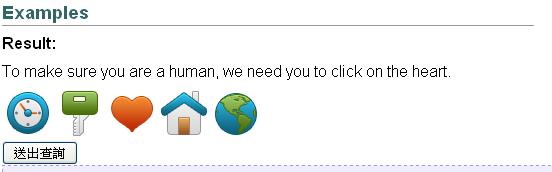
最近發現jQuery也有Captcha
下面便介紹兩種Captcha
傳統上,大多數的網站都是用數字驗證or英文+數字混合來做驗證
但最近jQuery有人製作出用選圖來做驗證
包爾伯 發表在 痞客邦 留言(2) 人氣(5,882)

今天一整天都在使用JSON,用到頭昏眼花
看了一堆前人的code,然後使用我最擅長的Copy and Paste大法
剛開始不去抓資料庫資料,還算順利,一下就出現結果
可是呢,當我需要開始撈自己資料庫時,卻一直像鬼打牆般的資料出不來
包爾伯 發表在 痞客邦 留言(1) 人氣(19,989)
動態產生的checkbox 若要做判斷是否有被勾選到
最基本的方法就是
for( int i = 0; i < checkboxlist.length; i++ )
{
if( checkboxlist[ i ].checked )
{
// do other stuff
}
}
包爾伯 發表在 痞客邦 留言(0) 人氣(5,140)
<html>
<head>
<title>File Upload Example</title>
<script language=”JavaScript” type=”text/javascript”>
function HandleFileButtonClick()
{
document.frmUpload.myFile.click();
document.frmUpload.txtFakeText.value = document.frmUpload.myFile.value;
}
</script>
</head>
<body>
<form name=”frmUpload”>
<!– Real Input field, but hidden–>
<input type=”file” name=”myFile” style=”display: none”>
<!– Fake field to fool the user –>
<input type=”text” name=”txtFakeText” readonly=”true”>
<!– Button to invoke the click of the File Input –>
<input type=”button” onclick=”HandleFileButtonClick();” value=”Upload File” style=”background: red;”>
</form>
</body>
</html>
包爾伯 發表在 痞客邦 留言(0) 人氣(2,050)
<SCRIPT language=”JavaScript”>
<!– Begin
function movepic(img_name,img_src) {
document.getElementById(img_name).src=img_src;
}
// End –>
</SCRIPT>
包爾伯 發表在 痞客邦 留言(0) 人氣(7,840)
function detectBrowser()//判斷是否用IE瀏覽器
{
var sAgent = navigator.userAgent.toLowerCase();
this.isIE = (sAgent.indexOf(”msie”)!=-1); //IE6.0-7
this.isFF = (sAgent.indexOf(”firefox”)!=-1);//firefox
this.isSa = (sAgent.indexOf(”safari”)!=-1);//safari
this.isOp = (sAgent.indexOf(”opera”)!=-1);//opera
this.isNN = (sAgent.indexOf(”netscape”)!=-1);//netscape
this.isMa = this.isIE;//marthon
this.isOther = (!this.isIE && !this.isFF && !this.isSa && !this.isOp && !this.isNN && !this.isSa);//unknown Browser
}
var oBrowser = new detectBrowser();
if (!oBrowser.isIE)
{
alert(”Please use IE6.0/7.0(or above version).”);
}
包爾伯 發表在 痞客邦 留言(0) 人氣(6,505)
* 與各個function程式碼相連的設定:
<form id=”FORM1″ name=”form1″ onsubmit=”return checkform(document.forms[0]);” action=”WebForm1.aspx”
* 範例:HarBaLife2 和 AmwayText1
* 欄位設定:
姓名:20 、電話:25、地址:50、信箱:50、身高:3、說明(理由):100
資料庫設定:id:int.4(nchar.5)、name:varchar.50、sex:char.1、phone:varchar.30、BirthDate:datetime.8、address:varchar.60、mail:varchar.50、Height:numeric.9、CheckBoxList:varchar.100、RadioButton:char.1、why:nvarchar.200、writeDate:datetime.8(預設值-(getdate()))、Photo:image.16
UserName:varchar.10、UserPasseword:varchar.10
myform=document.forms[0];//以下為它的二種寫法
<FORM id=”Form1″ name=”form1″ onsubmit=”return checkform(1);” method=”post” runat=”server”>
<FORM id=”Form1″ name=”form1″ onsubmit=”return checkform(document.forms[0]);” method=”post” runat=”server”>
————————————————————————————————————————–
<<>>
為避免填寫人在txt欄內填寫「<>」符號,故用程式碼設定-當填寫人填寫到<>時,則自動轉換成文字。
(1)在html語法上加上【validateRequest=”false”】:
ex:<%@ Page language=”c#” Codebehind=”page_test.aspx.cs” AutoEventWireup=”false” Inherits=”AmwayTest_test.WebForm1″ validateRequest=”false” enableViewStateMac=”True”%>
(2)在apsx程式碼內加上:
private string CheckInputData(string strInput)
{
strInput = strInput.Trim();
strInput = strInput.Replace(”‘”,”");
strInput = strInput.Replace(”–”,”");
strInput = strInput.Replace(”;”,”");
strInput = strInput.Replace(”\”",”");
strInput = strInput.Replace(”<”,”<”);
return strInput;
}
function DateDemo()
{
???var d, s = “Today’s date is:”;
???d = new Date();
???s += (d.getMonth() + 1) + “/”;
???s += d.getDate() + “/”;
???s += d.getYear();
???return(s);
}
<txt>
html control驗證:
(1)namevalue=myform.name.value;
(2) if (namevalue==”")
{
alert (’您尚未填寫【姓名】!’);
return false;
}
web control驗證:
(1)if(document.FORM1.Question1[0].checked!=true && document.FORM1.Question1[1].checked!=true && document.FORM1.Question1[3].checked!=true && document.FORM1.Question1[3].checked!=true && document.FORM1.Question1[4].checked!=true && document.FORM1.Question1[4].checked!=true)
{
alert(”您對於您每天喝的飲用水品質覺得安心嗎?”);
document.FORM1.Question1[0].focus();
return false;
}
radio為單選狀態
//Question4為欄位id,[n]的n為radio內所包含的選擇單子。
<Radiobutton>
html control驗證:
(1)sexvalue=myform.sex;
(2)if ( RadioChk (sexvalue)==false )
{
alert (’您尚未選擇【性別】!’);
return false;
}
(3)
function RadioChk (myRadio)
{
var checked = false;
for ( i =0 ; i < myRadio.length; i++)
{
if (myRadio[i].checked )
{
checked = true;
}
}
return checked;
}
web control驗證:
(1)if(document.FORM1.Question4[0].checked!=true && document.FORM1.Question4[1].checked!=true && document.FORM1.Question4[2].checked!=true && document.FORM1.Question4[3].checked!=true && document.FORM1.Question4[4].checked!=true)
{
alert(”請問您對台灣整體的飲用水品質的評價?”);
document.FORM1.Question4[0].focus();
return false;
}
<RadiobuttonList+理由>
web control
//抓「其他」此欄的id,再判斷是否讓「理由」欄的id呈現出來
(1)function Validator()
{
if(document.getElementById(’Question5_5′).checked)
{
document.FORM1.txtQ5_Extra.disabled=false;
}
else
{
document.FORM1.txtQ5_Extra.disabled=true;
}
}
<dropdownlist>
html control驗證:
Expectationvalue=myform.Expectation.selectedIndex;
if ( Expectationvalue==0)
{
alert (” 您尚未選擇【希望可以】! “);
return false;
}
web control驗證:
if(stQuestion2==false)
{
alert(’您認為台灣哪一個縣市的飲用水品質最好?’);
document.FORM1.Select1.focus();
return false;
}
checkboxlist為複選狀態
<checkboxlist>
html control+驗證:
(1)
<form id=”FORM1″ name=”form1″ onsubmit=”return checkform(document.forms[0]);” action=”WebForm1.aspx”
(2)
function MultiValidator(myform)
{
for(var i=0; i<myform.elements.length; i++)
{
var e = myform.elements[i];
if( (e.type==’checkbox’) && e.name.indexOf(’CheckBoxList’) >=0 && (e.checked == true) )
{
return true;
}
}
return false;
}
function Checkchkothers(myform)
{
chkOthersvalue=myform.chkOthers.checked;
if (chkOthersvalue==true)
{return true;}
else
{return false;}
}
function Checktxtothers(myform)
{
txtOthersvalue=myform.txtOthers.value;
if (txtOthersvalue==”")
{return false;}
else
{return true;}
}
(3)
「其他」此欄需在html語法中加:onclick=”EnableUploadSample(document.forms[0])”
ex:<input id=”chkOthers” onclick=”EnableUploadSample(document.forms[0])” type=”checkbox” CHECKED
value=”9″ name=”chkOthers” runat=”server”>
function EnableUploadSample(myform)
{
var txtOthers=document.getElementById(’txtOthers’);
if(myform.chkOthers.checked)
{
txtOthers.disabled=false;
}
else
{
txtOthers.value=”";
txtOthers.disabled=true;
}
}
(4)
function checkform (myform)
{
if(MultiValidator(myform)==false && Checkchkothers(myform)==false && Checktxtothers(myform)==false)
{
alert(’您尚未選擇【減重方式】!’);
return false;
}
else if(MultiValidator(myform)==false && Checkchkothers(myform)==true && Checktxtothers(myform)==false)
{
alert(’您尚未填寫【其它方式】!’);
return false;
}
else if(MultiValidator(myform)==true && Checkchkothers(myform)==true && Checktxtothers(myform)==false)
{
alert(’您尚未填寫【其它方式】’);
return false;
}
}
(5)
因為是複選題,故需在asps程式碼內設定「值與值間的分隔符號」。
foreach (ListItem item in Question10.Items)
{
if (item.Selected)
{
strQuestion10+=item.Value+”;”;
}
}
strQuestion10=strQuestion10.Substring(0,strQuestion10.Length-1);
包爾伯 發表在 痞客邦 留言(0) 人氣(1,133)
<script type=”text/javascript”>
function CutToClipboard()
{
CutTxt = document.selection.createRange();
CutTxt.execCommand(”Cut”);
}
function CopyToClipboard()
{
CopiedTxt = document.selection.createRange();
CopiedTxt.execCommand(”Copy”);
}
function PasteFromClipboard()
{
document.Form1.txtArea.focus();
PastedText = document.Form1.txtArea.createTextRange();
PastedText.execCommand(”Paste”);
}
</script>
And the markup:
<form name=”Form1″>
Select this text, copy it using the copy button, and paste it below.<br /><br />
<textarea id=”txtArea” cols=”60″ rows=”5″></textarea>
<br />
<input type=”button” onClick=”CutToClipboard()” value=”Cut to clipboard” />
<input type=”button” onClick=”CopyToClipboard()” value=”Copy to clipboard” />
<input type=”button” onClick=”PasteFromClipboard()” value=”Paste from clipboard” />
</form>
====================================================
上面的Code有可能不能用,不能的話就試試看下面的
<script type=”text/javascript”>
function CopyToClipboard()
{
document.Form1.txtArea.focus();
document.Form1.txtArea.select();
CopiedTxt = document.selection.createRange();
CopiedTxt.execCommand(”Copy”);
}
</script>
<textarea id=”txtArea” cols=”60″ rows=”5″>You can also copy text from this textarea. Or you can paste the text here, using the Ctrl+V key combination.</textarea>
<br />
<input type=”button” onClick=”CopyToClipboard()” value=”Copy to clipboard” />
包爾伯 發表在 痞客邦 留言(0) 人氣(3,782)
電話號碼驗證
[.Net]
<asp:regularexpressionvalidator id=”Validphonenum” ControlToValidate=”phonenum” Display=”Static” ValidationExpression=”\(0\d{1}\)\d{4}\-\d{4}|\(0\d{1}\)\d{3}\-\d{5}|\(0\d{2}\)\d{3}\-\d{3}|\(0\d{3}\)\d{6}” runat=”server” ErrorMessage=”電話號碼格式有誤”>
[javascript]
if(NaN(txtphone.text))
{
alert();
return false;
}
========================================================
<script language=”javascript”>
function CheckForm(myForm)
{
var sHours=myForm.txtHours.value;
if(sHours==”")
{
alert (” 請填入課程時數”);
myForm.txtHours.focus();
}
else
{
if(isNaN(sHours))
{
alert(” 請填入課程時數為數值 “);
myForm.txtHours.focus();
return false;
}
}
}
</script>
<INPUT id=”txtHours” onblur=”CheckForm(document.forms[0])” type=”text” name=”txtHours” runat=”server”>
包爾伯 發表在 痞客邦 留言(0) 人氣(3,194)


 房屋買賣知識 (2)